 Inbox Pilot
// Chrome extension
Your ChatGPT, at the controls of your Gmail
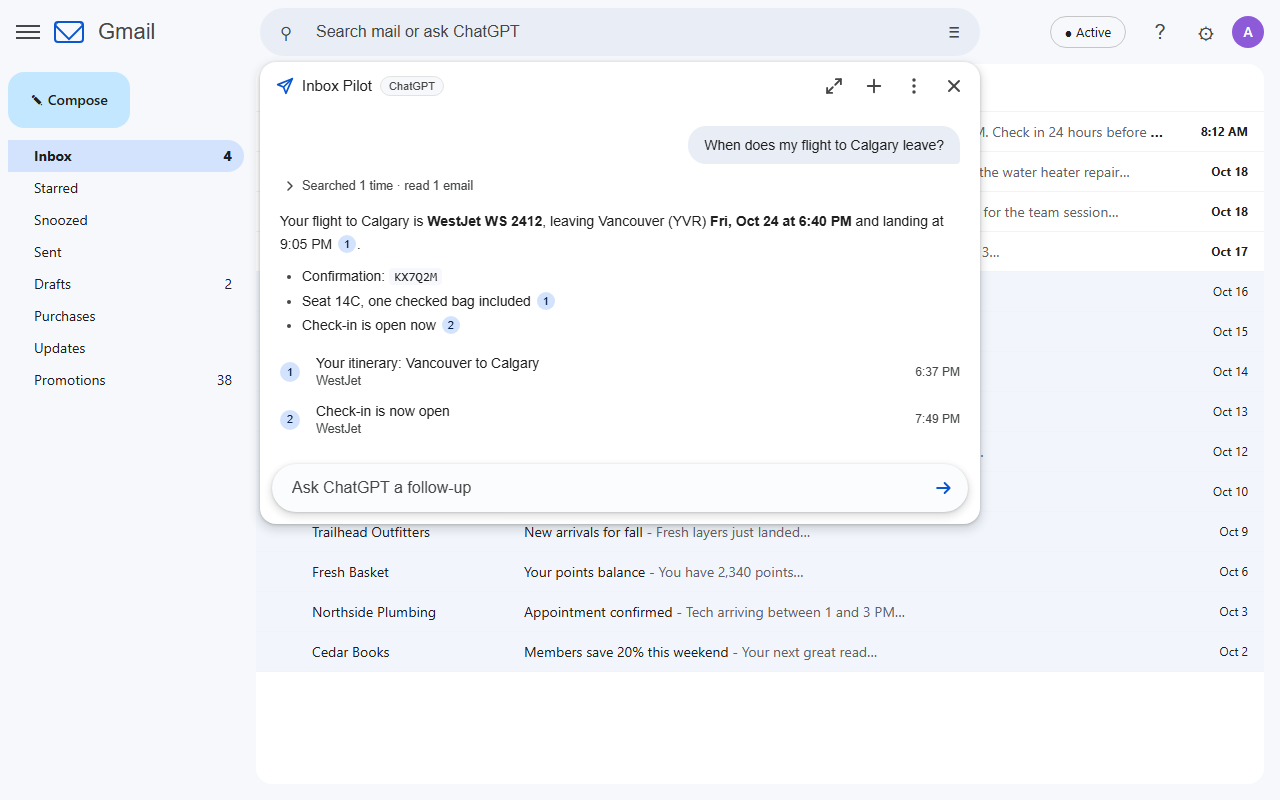
Type a question into Gmail's search bar and press Enter. ChatGPT searches your mailbox, reads what it needs (attachments included), answers with links to the exact emails, drafts replies, and tidies your inbox when you ask. It runs on your own ChatGPT plan, and it is not Gmail's built-in "Ask Gmail".
Coming soon to the Chrome Web Store
// What you can ask
Plain English, straight from the search bar
- When does my flight to Calgary leave, and what's the confirmation number?
- How much is the plumber's invoice and when is it due? (reads the PDF)
- Summarize this email and tell me what they need from me (uses the email you have open)
- Draft a reply saying Thursday works (saves a draft; never sends)
- Archive the promotions older than two weeks (shows you the list first; Undo afterwards)
- Show me everything from the school this month (runs the search in Gmail)
Ordinary searches like from:bob invoice still search Gmail exactly as before. A small chip in the search bar always shows whether Enter will search or ask, and one click flips it.
// Features
An assistant for your inbox, not just a chat box
Find
Questions become precise Gmail searches, retried and broadened until it finds the answer, with numbered links to the emails it used.
Read
Whole threads and attachments: PDF, Word, Excel, PowerPoint, text and CSV. "This email" means the one you have open.
Draft
Replies threaded into the conversation, or new emails, saved as drafts and opened for you. It has no way to send.
Organize
Archive, mark read, star, label, move to inbox or Trash, always after you review and confirm the list, with Undo.
Looks like Gmail
The answer drops down under the search bar like Gmail's own suggestions, in Gmail's light or dark theme. Expand for long conversations.
Your ChatGPT plan
Signs in with your ChatGPT account (Plus or higher, with Codex). No API key, and your plan's own models to choose from.
// Setup
About ten minutes, once
The extension's settings page walks you through every step and checks each one for you.
- Connect ChatGPT. Click Connect ChatGPT, enter the short code on OpenAI's page, and approve Codex (the part of ChatGPT the extension signs in through).
- Create your own Google app. Free, no credit card. Five ticked-off parts with direct links: a Google Cloud project, the Gmail API, the app's name, yourself as a test user, and a sign-in client whose ID you paste back. Nobody else's app ever touches your mail.
- Connect Gmail. Pick your account, click Continue on "Google hasn't verified this app" (it is your own app), and tick the Gmail boxes.
- Ask. Type a question into Gmail's search bar and press Enter.
// Support
Getting help
The settings page shows what is connected and the exact fix for every error Google or OpenAI can show. Common ones:
| Symptom | What to do |
|---|---|
| "Device code sign-in is turned off" | In ChatGPT: Settings, Security, turn on Enable device code sign-in for Codex, then connect again. Workspace accounts need their admin to allow it. |
| "Access blocked: … has not completed the Google verification process" | Your Gmail address is not a test user of your Google app yet. Add it under Google Auth Platform, Audience, Test users. |
| "Error 400: redirect_uri_mismatch" | Your OAuth client's redirect URI must match the one the settings page shows exactly, including the slash at the end. |
| Drafts or organizing say "read-only" | Settings, Allow drafts & organizing, and tick both Gmail boxes on Google's screen. |
| "Usage limit reached" | Your ChatGPT plan's Codex limit for now. It resets on its own; the message says when. |
| Nothing changes in Gmail | Reload the Gmail tab after installing or updating. Type a question and look for the Ask ChatGPT ↵ chip in the search bar. |
Still stuck, found a bug, or have an idea? Get in touch. Mention your Chrome version and what the settings page shows.
// Privacy
Private by design
No Inbox Pilot server, no analytics, nothing sent to the developer. The extension talks only to Google (your Gmail, through a Google app you own) and OpenAI (your ChatGPT account), and conversations live only in the Gmail tab you asked in. Read the privacy policy.